|
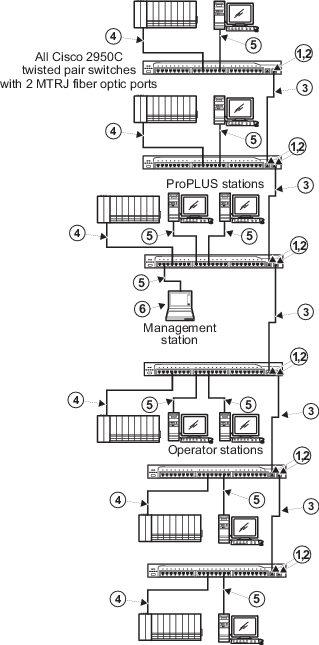
The two MTRJ ports on this switch are set
by Cisco to 100BASE-FX full duplex operation. Neither the speed nor duplex can
be changed. Ensure that any devices attached to these ports are properly
configured for 100BASE-FX full duplex operation
before making the connection.
|

|
If switch management is to be used over
the network via telnet or a web browser, be aware that access privileges and
port configuration requirements exist for both fiber-optic and twisted pair
switch-to-switch links. Refer to "Managing Cisco Switches" in Books Online for
information. Refer to the Cisco documentation for web management information. A
dedicated non-DeltaV PC is required for switch management. Use an IP address
from the address range allowed for switches for this PC .
|

|
2Km (max) full duplex Multimode Fiber with
MTRJ Connectors.
|

|
100 m (max) straight-through cable. The
shield on the controller's RJ45 connector connects only to a Faraday cage in
the controller; not to the controller's DC ground. Therefore, the RJ45
connectors are floating and the single point of ground is made at the hub or
switch to which the controller is connected. Build this cable assembly with a
shielded, metal-enclosed RJ45 connector on
both ends .
|

|
100 m (max) straight-through cable. To
prevent ground loops, build this cable assembly with a shielded, metal-enclosed
RJ45 connector on one end and an isolated, plastic-enclosed RJ45 connector on
the other end. The metal connector end of this cable assembly/link
must be placed on the switch and
not on the PC.
|

|
The Management station has special
hardware and software requirements. Refer to the related topics for information
on the management station before connecting the station to the DeltaV Control
Network.
|