To install the 2-wide power/controller carrier
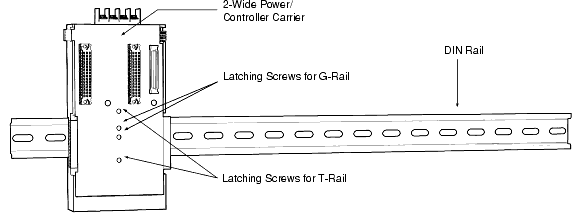
Refer to Figure: 2-Wide Power/Controller Carrier Installation.
-
Turn the screws counter-clockwise on the power/controller carrier
to disengage the latch. Place the carrier on the rail and tighten the screws
clockwise to latch.
Note
The middle two screws are for G-rail mounting and the upper and lower screws are for T-rail mounting.
Note2-wide carriers should be installed to the left of any 8-wide carriers.