WARNING!
Before installing a card in a carrier slot, ensure that the bussed field power voltage at the slot matches the field power requirements for the card. Card damage can result during installation if there is a mismatch between the field power voltage at a carrier slot and the card installed in the slot.
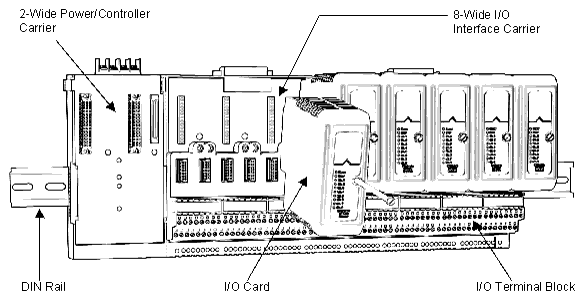
Refer to Figure: I/O Card Installation.
-
Locate the assigned slot on the I/O interface carrier.
WARNING!
I/O cards are designed to be installed on terminal blocks. If you temporarily install a card on the carrier without a terminal block, be sure to carefully align the pins on the card with the connector on the carrier to prevent damage to the pins.
- Tighten the mounting screw.