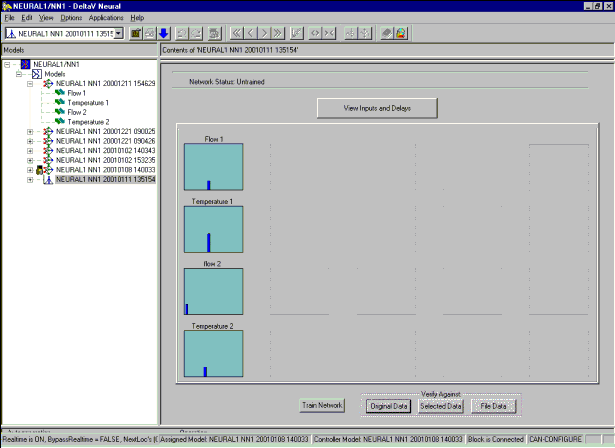
The following figure shows the view for an untrained network with the Expert option selected.
Hierarchy
The Hierarchy View in the left upper pane of the interface shows the model structure of the NN block the application is currently connected to.
Network Status
The network status line displays if the model is trained or untrained.
When viewing a Sensitivity Analysis node, this area contains the message: Network Status: Untrained.
When viewing a trained model, this area contains the message: Network Status: Trained, as well as the number of inputs the model uses, the number of hidden neurons, and the Train and Test Error values in EU.
View Inputs and Delays Button
The View Input button opens a dialog that shows the inputs, the delay for each input, the sensitivity value at that delay, and whether the input is used in the model. If this is a Sensitivity Analysis node, the values can be modified.
Sensitivity Matrix
The sensitivity matrix display shows thumbnail views of the sensitivities that indicate how changes in the inputs affect the process model output. Click a thumbnail to view details of a particular sensitivity.
Train Network Button
After ensuring the Sensitivity Analysis results, click the Train Network button to train the network and assign the model to the NN function block. The button opens a dialog from which you set various training parameters. This button is available to Expert users only.
Original Data Button
After you have trained the neural network, click the Original Data button to determine how well the model fits the sampled data. The button opens a dialog that compares the model's predictions with the original sampled output data used to train the model.
Selected Data Button
After you have trained the neural network, click the Selected Data button to determine how well the model fits the sampled data. The button opens a dialog that compares the model's predictions with the sampled output values over the selected data (marked by the green area in the historical trend).
File Data Button
After you have trained the neural network, click the File Data button to verify the model from data stored in a valid NN data file format. The verification compares the model's predictions with the values from the data file.