This feature is intended for debugging and should not be used continuously. While monitoring items, OPC Mirror's performance can significantly decrease because of all the monitor program code that is executing.
In the case where there are two instances of Mirror Diagnostics running and both are using the Monitoring Mapped Items feature, closing Monitor Mapped Items in one instance will stop the Monitor Mapped Items from updating in the other instance. To get around this, close the Monitor Mapped Items dialog in the instance that you still want to monitor and then re-open it.
If you are running redundant OPC Mirror clients on a pair of Application Stations, Mirror Diagnostics functions independently on each Application Station. To monitor information about mapped items in a pipe, you should rely on data reported by the Monitor Mapped Items feature only by Mirror Diagnostics running on the Application Station where the active OPC Mirror client is currently running. Data reported by the Monitor Mapped Items feature in Mirror Diagnostics running on the Application Station where the standby OPC Mirror client is running may not be up-to-date. Also, after a switchover, the last write value and status of slow-changing, static data may not be reported by the Monitor Mapped items feature until the next occurrence of the event.
Monitor Mapped Items provides a run-time monitoring view of the mapped items in a pipe. Up to 20 mappings from the same pipe can be monitored at one time. The monitoring dialog displays the item ID, item value and item quality of the source tem, and the item ID, item value and write quality of the destination item. It also displays the direction of the write and the time the source item was last updated.
Initially, the destination items will typically have an "Unknown" write quality and an empty value field. Once the source item value changes, the write quality of the destination item will change to either "Write Successful" or "Write Failed" and the destination value may or may not change depending upon the quality of the write.
For two-way pipes, where the items can be both source and destination, the write can go in either direction. Initially, the source item will be the initial data node and the direction will show a two-way arrow. Once either of the mapped items values change, the direction arrow will change to the direction of the write.
- Start Mirror Diagnostics by selecting .
- Select an activated pipe by clicking it.
- Select from the top menu bar.
- Select up to 20 mapped items from the list and click the Add Item For Monitoring button.
- Click the Start Monitoring button.
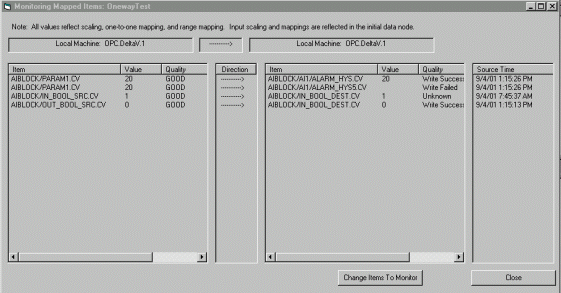
Monitoring Mapped Items monitors the values in OPC Mirror and not in the servers. Thus, it is possible for the monitoring dialog to display a value for an item that is different from the server value. For example, if a destination item value changed, it would not be updated in the monitoring dialog unless it was also a source item in another mapping, the pipe was refreshed, or the source item was changed too. If you are in doubt and need to verify the item value in the server, use the Validate Mapped Items utility in Mirror Configuration.