Cold restart of a batch from the lost and recover_failed states
If a batch is in the Lost or Recover_Failed state, you can select it for restarting. After you click the Restart button you are asked if you want to perform a Warm or Cold Restart. Select Cold Restart and the batch transitions through the Recovering state to the Ready state, as if it were a new batch. The batch maintains ownership of the equipment it had previously acquired. Click the Start button to start the batch from the beginning.
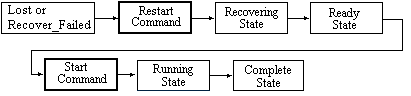
One of the ways a batch can be in the Lost state is after being forced to shut down from the Administer Batches tab on the Advanced dialog for the Batch Application Manager.
To determine why a batch is in the Recover_Failed stated, right-click the batch in the batch list.
Any phases that were running in the controller and waiting on a response from the operator or Batch Executive could still be running. You must manually unload the phase, which can be accomplished from the unit phase faceplate.