User ID Verification in the Batch Operator Interface
User ID Verification is defined on the Batch Executive. When configuring the Batch Executive, you have the option of defining settings to require an operator to confirm batch actions such as adding a batch, modifying a batch, aborting a batch, and so on. In addition, you can specify that an action requiring a confirm also requires a verification by a supervisor.
As a Batch Operator Interface connects to the Batch Executive, the settings for the Prompts, Confirms, and Verifies are set for that workstation. That is, all Batch Operator Interfaces that connect to the same Batch Executive will have the same Prompt, Confirm, and Verify settings.
To view the User ID Verification configuration from the Batch Operator Interface, click the Configuration and Defaults button on the toolbar. Then select the General tab.
Batch Operator Interface Confirm and Verify Options
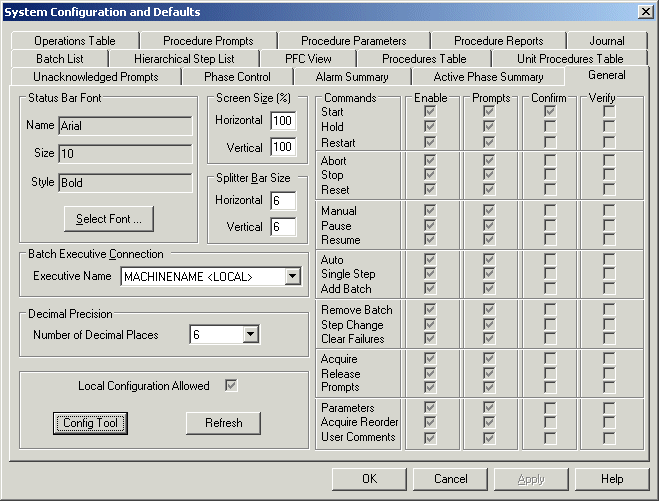
Once the confirm and verify functionality has been enabled, a dialog is displayed for the command or prompt requesting the confirmation and verification. For example, when an operator selects a Batch Operator Interface command (such as Start) that includes both a confirm and verify setting, the following dialog is displayed.
Dialog Requesting a Confirm and Verify
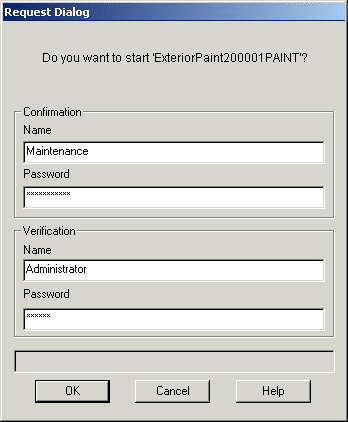
When the confirmer and/or verifier username exists as both a local and a domain account with different passwords, the Batch Operator Interface will validate against the local username only. Therefore, in this case, the local username and password combination must be used.
Records containing the user IDs entered to confirm and verify the selected action are saved in the event file (.EVT) for the individual batch.