The Batch Executive properties
To support loading and handling of large batch systems, every DeltaV system supports multiple Batch Executive subsystems. Each Batch Executive subsystem is configured in the DeltaV Explorer and consists of the Batch Executive, Assigned Areas, and Assigned Recipes components. A maximum of four Batch Executives can be enabled on a single DeltaV Network.
A Batch Executive Subsystem
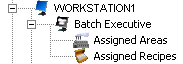
Configuring a Batch Executive's properties entails enabling the Batch Executive, which designates a machine as a location for the Batch Executive server to run, and defining the behavior of the Batch Executive server.
Below each Batch Executive is the Assigned Areas object. This container provides a way to quickly see the equipment that has been assigned to this Batch Executive. Batch control is organized through process cells that contain the batch equipment (units) and areas that contain the process cells. Therefore, when you assign an area to a Batch Executive subsystem, you also assign the equipment contained in that area to that Batch Executive. An area can be assigned to only one Batch subsystem at a time.
Each Batch Executive also contains an Assigned Recipes object. When you assign recipes and recipe folders to the Batch Executive, you release the recipe to production, making it available to the operator to create and run the recipe. Individual recipes and recipe folders can be assigned to run on multiple Batch Executives; however, all the units needed for a particular recipe must reside on one Batch Executive.
All of the batch components can still be configured without enabling the Batch Executive but they cannot be tested.
Each Batch Executive sends its events to one Batch Historian.