To verify the coordination of request messages between the dump and charge color phases, you will act as the Batch Executive (that is, you will manually acknowledge and clear the phase requests). During the next exercise, you will also verify the following:
- The messages are sent and received.
- The COLOR_HEADER module is acquired and released.
- The correct amount of product is transferred from UM_COLOR_100 to UM_BLEND_500.
The way you will do these tasks is to open the Batch graphic in DeltaV Operate, start each phase, wait for the phase request codes to appear in the REQUEST parameter data link, and clear the requests by changing the data link value to 0. (In practice, you would never write 0 to a REQUEST parameter; this is something only the Batch Executive should do.)
You can keep the Batch graphic open in DeltaV Operate or you can switch back and forth from the Batch graphic to the Process graphic if you want to see what happens at each step in the phase communication.
Each box on the Batch graphic represents a unit module and has data links that let you access the unit module directly. For example, the box representing the unit module UM_COLOR_100 looks like this:
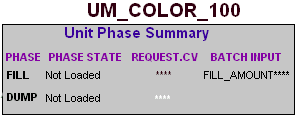
To start a phase, click the unit module name to open the unit module faceplate, load the phase, open the phase faceplate, and open the command list. Use the Batch graphic in the same way as when you filled the first color tank to approximately 100 gallons. Now you will coordinate the phases to dump the color from the color tank and charge the blender.