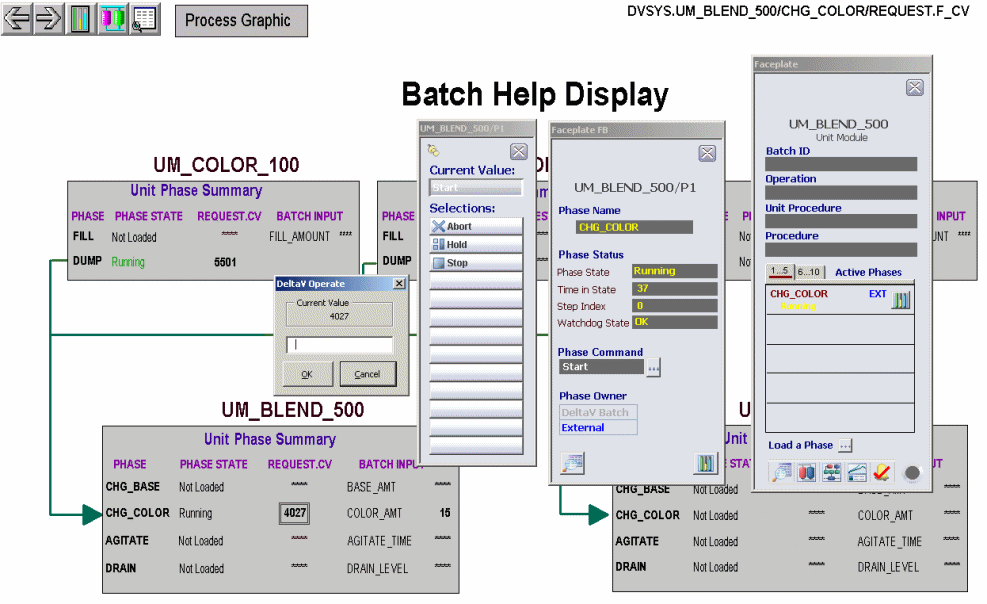
Load the FILL phase, open its faceplate, and start the FILL phase.
The color tank fills to approximately 100 gallons. When complete, send a Reset command and unload the FILL phase.
Load the DUMP phase for UM_COLOR_100 and open its faceplate.
Open the command list, and then click Start.
The DUMP phase state changes to Running. The REQUEST parameter changes to 5501, indicating it is waiting for the first message.
Load and start the CHG_COLOR phase in unit module UM_BLEND_500.
The CHG_COLOR state changes to Running and waits with a 40nn (such as 4027) request to acquire the color header resource.
Clear the 40nn request in CHG_COLOR by clicking the number and entering 0 in the Data Entry dialog.
This gives control of the two valves in the color header to the CHG_COLOR phase.A new request, 5201, appears. This request synchronizes with the 5501 request in the DUMP phase.
Clear the 5201 request and the 5501 request.
Two new requests, 5202 and 5502, are written to DUMP and CHG_COLOR, respectively. The outlet valve XV_OUT_100 from the color tank opens.
Clear 5202 and 5502.
Request 5503 is written to the DUMP phase. Inlet valve XV_COLOR_500 opens, and UM_BLEND_500 starts filling.
Open the Process graphic so you can see UM_BLEND_500 fill.
(The default charge amount, 15 gallons, was specified earlier, in the phase class definition.) When the tank stops filling, return to the Batch graphic. When the tank charge is complete, Request 5203 (to close the inlet valve XV_COLOR_500) is written to the CHG_COLOR phase.
Clear 5503.
On the faceplate for DUMP, the state goes to Complete, and outlet valve XV_OUT_100 closes.
Clear 5203.
Valve XV_COLOR_500 closes. Request 42nn is written to the CHG_COLOR phase to request release of the color header.
Clear 42nn.
On the faceplate for CHG_COLOR, the state goes to Complete.
Send a Reset command to CHG_COLOR and unload the phase.
Send a Reset command to DUMP and unload the phase.
Close any open faceplates and close DeltaV Operate.
Tip
If you want to rerun the modules a few times, you need to be able to drain the blender. Since we don't have a drain phase yet, you can click the RESET BLENDERS button on the Process graphic. This resets the blender tank level to 0.