A state-driven algorithm can also be used for the Running logic of an equipment module.
A state-driven algorithm selects one of a number of states, based on the value written to an algorithm setpoint parameter.For each state of the state-driven algorithm, the user defines the parameter setpoints that are to be set for subordinate modules. For each parameter setpoint, the user defines the path to the parameter to be written and, optionally, the path to a PV that can be read back to check that the parameter setpoint has been achieved.
We will now create BLENDER_OUTLET, a state-driven equipment module that will control output from the blenders. Depending on the desired state (Closed, Draining,or Releasing_Product), the equipment module will turn the outlet pump on or off and open or close the appropriate valves. Below is a picture of the control modules for the equipmentused in this part of the process system.
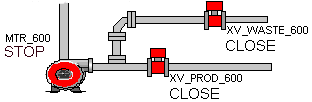
NC_VALVE is the control module class that will be used for the two valves. The 2STATE_MTR control module class was imported as part of the Startup.fhx file and will be used for the out pump. The 2STATE_MTR control module class was created from the MTR-11 module template and several blocks and parameters were added to it. The function block diagram for 2STATE_MTR is shown below.
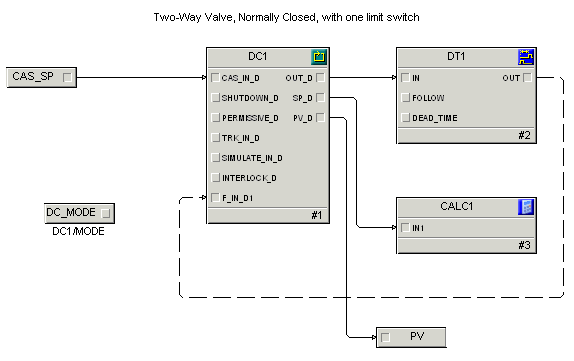
The DT (deadtime) and CALC blocks were added for purposes of simulating a live process. The DC_MODE, CAS_SP, and PV parameters were added in order to read to /write from the DC block.
The following table shows how the two valves and outlet pump are manipulated depending on the selected state. For the Closed state, the valves are closed and the pump is off; for the Draining state, the outlet pump is on and the waste valve is open; for the Releasing_Product state, the outlet pump is on and the product valve is open.