Equipment definition > Equipment module classes > Configuring the TOTALIZER equipment module class

Configure the logic for COMMAND_00001 (Totalize_fast)

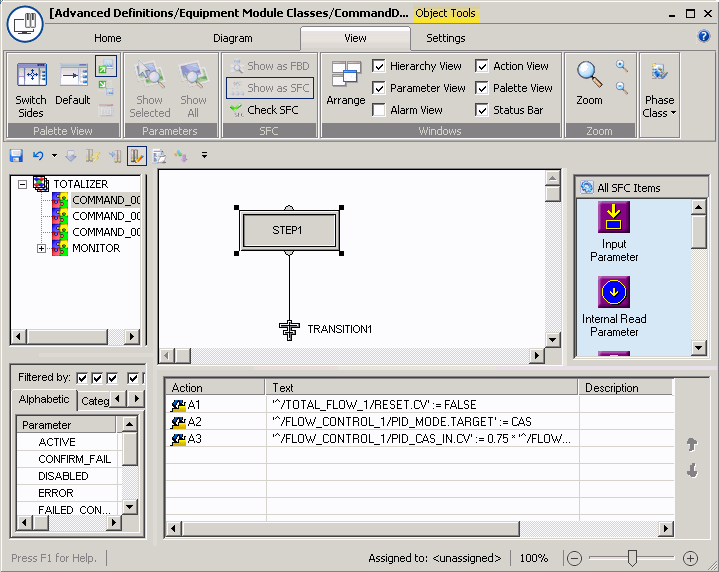
  1. Click COMMAND_00001 in the left pane. The right pane now shows a sequential function chart (SFC) with one step and one transition (termination).
  2. Click the S1 step.
  3. In the Action pane in the lower right corner, right-click and select Add to add an action to Step 1.
  4. Open the Expression Assistant and click Insert Internal Parameter to configure the following expression to reset the TOTAL_FLOW control module to 0. (Start browsing by clicking the Up One Level button to browse within the entire TOTALIZER module class for the TOTAL_FLOW block.) Enter the assignment symbol (:=) and type in FALSE.
    '^/TOTAL_FLOW_1/RESET.CV' := FALSE
  5. Add a second action to put the module in CAS mode to be able to write to CAS_IN.
    '^/FLOW_CONTRO_1/PID_MODE.TARGET' := CAS
  6. Add another action to write the setpoint to the control module. The setpoint will be 75% of the SP high limit. Create the following expression for the action:
    '^/FLOW_CONTRO_1/PID_CAS_IN.CV' := 0.75 * '^/FLOW_CONTRO_1/PID_SP_HI_LIM.CV'


The logic for Totalize_accurate is very similar to that for Totalize_fast. The main difference is that in the third action, the flow setpoint for FLOW_CONTRO_1 is assigned .25 so the loop setpoint is 25% of the SP high limit for more accurate filling of the last 10% of the desired input amount. You can configure the logic as in the procedure above or you can simply copy and paste the step action expressions from Command_00001 to Command_00002 and then change the 0.75 to 0.25.