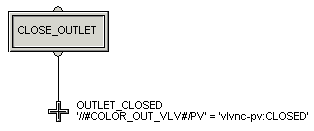
Move the termination icon to the bottom of the diagram and delete the connecting line.
Drag a transition icon from the palette to the spot where the termination was.
Rename the transition to OUTLET_CLOSED (to wait until the outlet valve is closed).
Double-click the transition.
The Properties dialog opens.
Open the Expression Assistant. Delete the default condition of False, select Insert Alias, and browse in Tanks → COLOR for the alias COLOR_OUT_VLV/PV.
Type an equals sign (=) or use the button provided.
To construct the right side of the transition condition, select Insert Named State, and browse for vlvnc-pv:CLOSED.
The expression now reads:
'//#COLOR_OUT_VLV#/PV' = 'vlvnc-pv:CLOSED'
Click Parse to check the expression and correct any errors.
Click OK in the Expression Editor and Properties dialogs.
Draw a line from the first step to the transition. The cursor automatically turns into an asterisk when it is in the correct position for drawing lines.