The Control Studio has multiple window panes you use to define the characteristics of a module. They are the Diagram View, the Parameter View, the Hierarchy View, and the Alarm View.
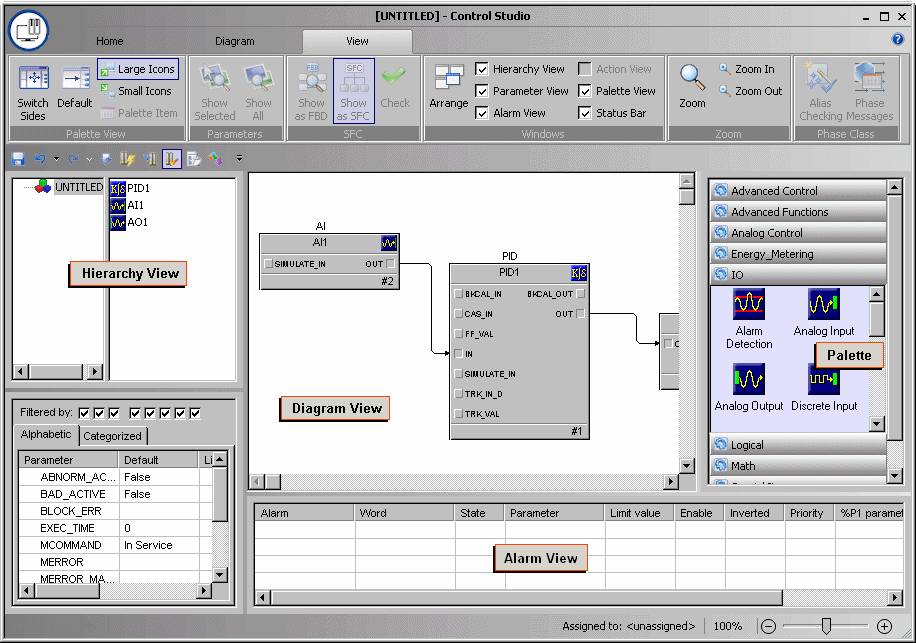
From the Hierarchy View, you view the components of the module and of its composite function blocks.
From the Parameter View, you define specific characteristics of objects on the diagram, such as function blocks, steps, or modules. You can view the parameters alphabetically or by parameter category.
From the Diagram View, you create function blocks and sequential function chart algorithms graphically on a diagram that defines how the module behaves.
From the Alarm View, you view the enabled alarms for the block or module. You configure the alarm limits, priorities, and more from the Alarm View.
From the Palette View, you access the icons that represent function blocks, modules, and SFCs.