After you select the Children of selected component button and click Next, the dialog changes to show a hierarchical view of the selected object and its children. Expand the hierarchy to see the items you export. You can select multiple items to export if they are all of the same type. For example, the following figure shows four devices under two cards and three ports selected for export.
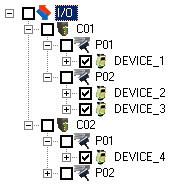
Click Next and the Format Source dialog appears unless the software detects that some of the selected objects cannot be exported. If so, take the appropriate action and continue.
After the Format Source dialog appears, return to the beginning of the Exporting User-Defined Data topic for information on how to continue the export.