The Auto-Update Diagnostics application is used to view information on the Auto-Update service running on this node. The Auto-Update service ensures that system-wide setup data is distributed automatically to all the workstation nodes whenever system-wide setup data is updated. Following is a description of the interface:
(Server) or (Client) - If this node is a Server, the information displayed corresponds to the server side (sending files) of the node. If this node is a Client, the information corresponds to the client (receiving files) side of the node. This is only useful on Remote Access Services (RAS) workstations that act as clients and servers at the same time.
Master Server - The name of the workstation containing the main set of files. For local nodes, this is always the ProfessionalPLUS workstation if it is available. If the ProfessionalPLUS is not available, another node will take its place. It takes 2 minutes for another node to take the place of the Master Server if the ProfessionalPLUS workstation becomes unavailable. Once the ProfessionalPLUS workstation becomes available, it immediately becomes the Master Server. For remote nodes, the Master Server is the node’s RAS.
Server State - The Auto-Update state of this node:
- Master Server - This node is sending out files.
- Backup Server - This node is receiving files and eligible to become a master server if the ProfessionalPLUS workstation is not available.
- Remote Node - The node is a remote node and not eligible to become a master server.
- Server Off - The communication subsystem is not running.
- Server Starting - The DeltaV system is starting.
Last Error - Shows the last error encountered by the Auto-Update service. The text describing this error persists until the next error occurs.
Copying Setup Data - TRUE indicates that the node is in the process of copying setup data (download scripts). FALSE indicates that the node is not in the process of copying setup data.
Copying Displays - TRUE indicates the node is in the process of copying displays, charts, AMS devices, or device alarm message files. FALSE indicates that the node is not in the process of copying displays, charts, AMS devices, or device alarm message files.
Remote Data Server - If TRUE, the node is a RAS.
Updating Yellow Pages - If TRUE the node is copying files from DvData to YellowPages. This is usually done on the ProfessionalPLUS workstation only.
Has Been Downloaded - If TRUE, the node is configured. The node will not perform any Yellow Pages activities until it is configured.
Average Announce Interval - The average elapsed time (10 seconds) to receive or send an announce message.
Time Since Last Announce - The elapsed time since the last announce message was sent (Server) or received (Client).
DeltaV Operate Version - Shows the version of DeltaV Operate running on the node.
Server DeltaV Operate Version - Shows the version of DeltaV Operate that is running on the server. The Auto Update Service will not copy displays from the server if the node and server are running different versions of DeltaV Operate.
Close - Clicking this button exits the application.
Sync - Clicking this button causes the entire system to look for new downloaded setup data. If found, all client nodes copy and download the new setup data. This button can be selected from either the Master Server or any client node. However, the node from which this button is selected must be communicating with its current Master Server.
Setup - Clicking this button opens a dialog for configuring application settings:
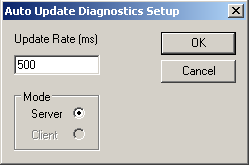
- Update Rate - The rate (in milliseconds) at which the application polls Yellow Pages.
- Mode - If this workstation is set up as a Remote Access Server (RAS), it can be both a client of the ProfessionalPLUS) and a server to remote workstations. This option allows the user to view Yellow Pages data from the client side (copying files from the ProfessionalPLUS) and from the server side (sending files to remote workstations).
Log File - Clicking this button opens a log file, DeltaV\DvData\Yellowpages.log, which recorded many Yellow Pages operations and can be used to debug problems.
Clear Messages - Clicking this button clears all messages.