In DeltaV Diagnostics, you can access information about users who are logged on through remote sessions. Those with sufficient privileges can also send messages to other users or disconnect those users. To access the diagnostics for remote sessions, right-click the Remote Client server, and select Remote Client Diagnostics. The Remote Clients dialog appears.
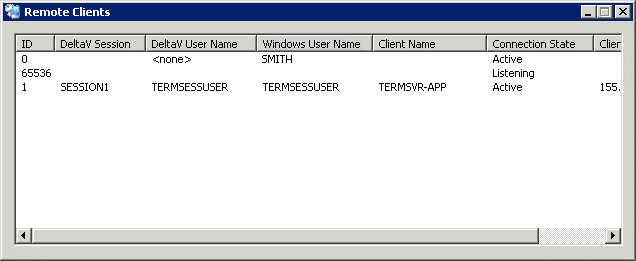
To send a message to another user, select a remote session by clicking the ID field, right-click, and then select Send User a Message from the context menu. To end a user's session, select Logoff User.
The fields in the Remote Clients dialog are as follows:
ID - A numerical identifier. An ID with a very high number, such as 65536 in the above example, is used for Windows server listener sessions that wait for requests for new client connections. No user is logged on to a listener session.
DeltaV Session - The session name, as identified in the DeltaV Explorer hierarchy.
DeltaV User Name - The name of the DeltaV User logged on to the session.
Windows User Name - The Windows user name of the user logged on to the session.
Client Name - The name of the remote node logged on to the session.
Connection state - One of 10 possible states:
- Active - A user is logged on to the server
- Connected - The server is connected to the client.
- Connecting - The server is in the process of connecting to the client.
- Shadow Connection - The server is shadowing another
- Disconnected - The sever is active but the client is disconnected.
- Idle - The server is waiting for a client to connect.
- Listening - The server is listening for a connection.
- Resetting WinStation - The server is being reset.
- WinStation Error - The server is down due to an error.
- Initializing - The server is initializing.
Client IP Address - The IP address of the client node