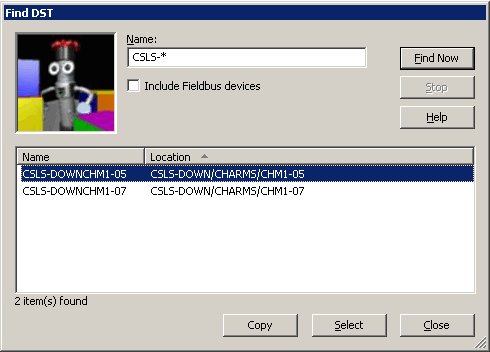
Find Device Signal Tags (DST) names and locations

From anywhere in the Diagnostics hierarchy, you can open the Find DST dialog, where you can generate a list of:

You can open the Find DST dialog in any of the following ways:


After opening the Find DST dialog, perform the following steps:

  1. Enter a complete or partial DST name specified with a wildcard pattern.
    Use the asterisk (*) wildcard character to match any combination of 0 or more characters; use the question mark (?) wildcard character to match any single character.
    Note

    A valid DST name cannot exceed 16 characters and may contain only alphanumeric characters, plus the dollar sign ($), hyphen (-), or underscore (_) character.

  2. Optionally, enable the Include Fieldbus devices option, to generate a list of FOUNDATION fieldbus device names matching the specified DST name.
    Important

    If you are running DeltaV Diagnostics on a remote workstation and its connection to the ProfessionalPLUS workstation does not support discovering FOUNDATION fieldbus device names, the Include Fieldbus devices option may be disabled.

  3. Click the Find Now button.
    Matching DST names, optionally including FOUNDATION fieldbus device names, and the placeholder paths of the physical addresses from the Diagnostics hierarchy for each DST found appear in the Name and Location columns of the DST table.