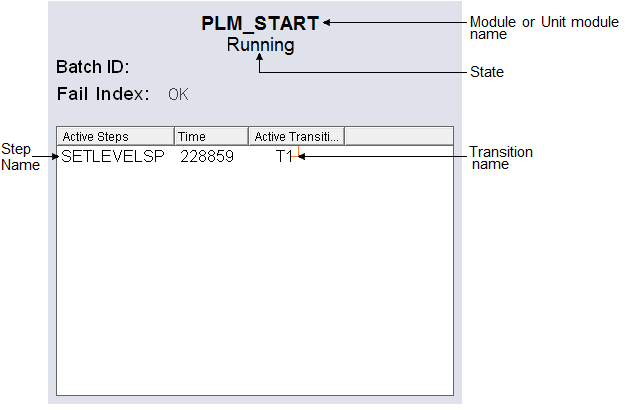
The dyn_PLM_ dynamo is used to show the active steps and transitions
configured in phase logic modules or unit phases.
- Display tag
- The name of the module or unit phase configured for this dynamo.
- State
- The state of the module or unit phase.
- Batch ID
- The Batch ID for the module or unit phase.
- Fail Index
- The fail index for the module or unit phase.
- Active Steps
- The names of the active steps running in the module or unit phase.
- Time
- The duration of time (in seconds) the active step has been running.
- Active Transitions
- The names of the active transitions running in the module or unit phase.
Tip
In the Dynamo Properties dialog, when specifying which unit phase to use with the dynPLM, use one of the following paths:
- To specify a particular unit phase, use DVSYS.UNITMOD/PHASENAME.
- To specify the phase currently loaded in first slot, use DVSYS.UNITMOD/P1.