This generic module faceplate has an Alarm Summary and Diagnostics information.
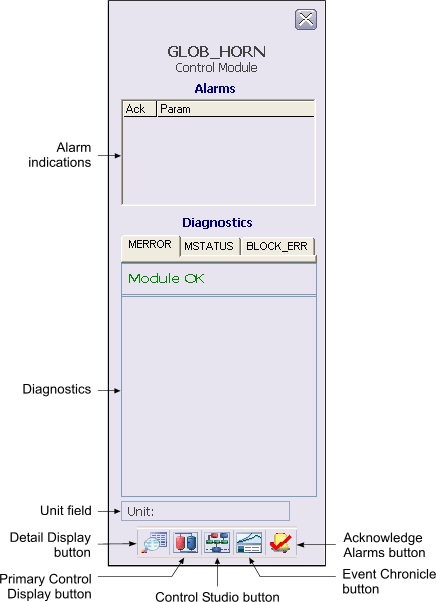
The following items are contained in the faceplate:
-
Alarm indications This is a scrollable list of the current alarms that functions like the first two columns of an alarm summary. The first column shows the state of the alarm represented by one of the following symbols:
The second column is the alarm name or parameter. The text and colors are as configured for the alarm's current state.
-
Diagnostics - This section displays visible text for active conditions in the module's MERROR, MSTATUS, and BLOCK_ERR parameters. There is a tab for each parameter. The parameter name on the tab is underlined when an active condition for that parameter is displayed. When an error has occurred in the module, a Clear Error button is displayed on the MERROR tab. Click this button to clear active errors.
-
Unit field - This field displays the unit name.
-
Toolbar - Click the icons from left to right to perform the following functions, respectively:
-
Module Error indicator (not shown) - A flashing blue bar is displayed below the Detail Display button when a module error occurs. This prompts you to go to the detail display to view and clear the error.