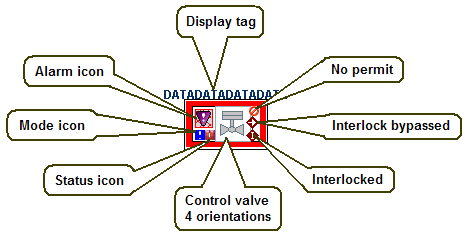
The valve's orientation (top, left, bottom, or right) is set when the dynamo is configured. The valve type (normally closed or normally open) is determined at configuration. The valve type determines the referenced threshold table to display the appropriate passive or active state color (Pump_DValve_Fill_Color for normally closed (NC) valves and Pump_DValve_Fill_Color2 for normally open (NO) valves.
The valve body's outline becomes thicker and has the named Abnormal color when the numeric value of PV_D is equal to the configured abnormal state (0, 1, 2, or None).
The actuator top's outline top becomes thicker and has the Abnormal color when the numeric value of SP_D is equal to the configured abnormal state (0, 1, 2, or None).
The valve's edge color is based on the DCEdge color in the NamedColors threshold table unless the abnormal color is being shown.