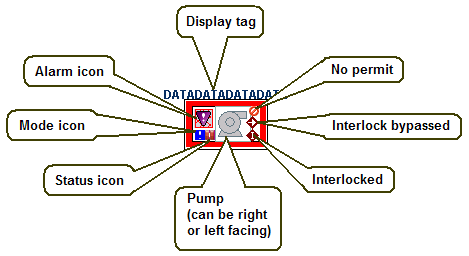
The pump's orientation (right or left) is determined when the dynamo is configured.
The following occurs at run time:
The pump's outline becomes thicker and has the named Abnormal color when the numeric value of PV_D is equal to the configured abnormal state (0, 1, 2, or None).
The pump's center oval outline becomes thicker and has the named Abnormal color when the numeric value of SP_D is equal to the configured abnormal state (0, 1, 2, or None).
The pump's edge color is based on the DCEdge color in the NamedColors threshold table unless the abnormal color is being shown.
The pump's foreground color indicates the PV_D state based on the threshold table DeviceControl_ColorGrey.