The ALM_STATS_fp faceplate provides a view of the Operator Statistic Module's KPI parameters (rounded to the nearest hundredths) in DeltaV Operate.
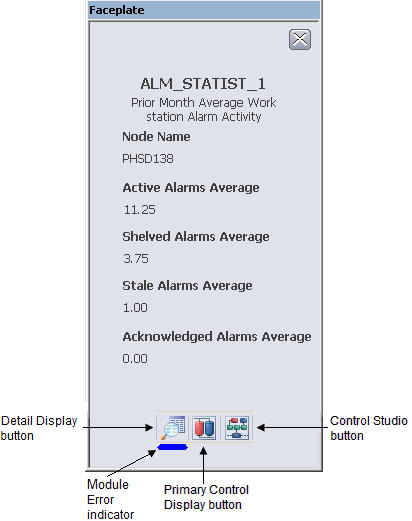
The following items are contained in the faceplate:
-
Node Name - The name of the operator workstation for which the KPIs are being computed.
-
Active Alarms Average - The average number of alarms in the active alarm list for this workstation node, for the prior month.
-
Shelved Alarms Average - The average number of alarms in the suppressed alarm list for this workstation node, for the prior month.
-
Stale Alarms Average - The average number of alarms in the active alarm list for this workstation node, for the prior month, and that have been active for over 24 hours.
-
Acknowledged Alarms Average - The average number of acknowledged alarms in the active alarm list for this workstation node, for the prior month.
-
Toolbar - Click the icons from left to right to perform the following functions, respectively:
-
Module Error indicator - A flashing blue bar is displayed below the Detail Display button when a module error occurs. This prompts you to go to the detail display to view and clear the error.