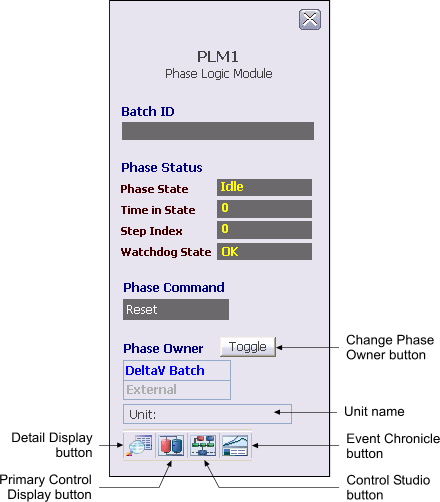
DeltaV Operate also supports a phase logic module faceplate display. The phase faceplate display supports the following:
-
Showing phase name and description
-
Showing Batch ID
-
Showing phase status (state, time in state, step index, watchdog state)
-
Showing the OWNER parameter (DeltaV Batch or External)
-
Providing a means to change ownership from DeltaV Batch to External (operator) by using the Change Phase Owner toggle button
-
Showing current phase command
-
Showing the Unit name (This field is populated only when the phase logic module is under a unit module)
-
Providing a means to issue commands to the active phase (Abort, Hold, Restart, Reset, and so on)
-
Providing a means to select the default monitor on which to present the faceplate
A standard detail display picture is provided for phase logic modules. You can navigate to the detail display using either the phase logic module faceplate display or the detail button on the PLM dynamo.
The toolbar contains the following buttons:
-
Detail Display button: open the detail display for the module.
-
Primary Control Display button: open the primary control display.
-
Control Studio button: open Control Studio.
-
Event Chronicle button: open the Process History Viewer.