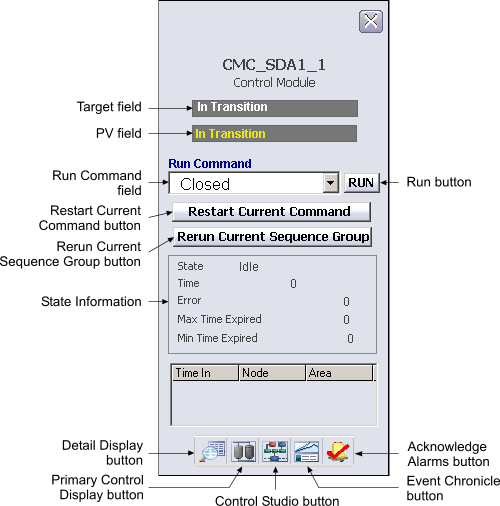
The following items are contained in the faceplate:
-
Bypass - This area is visible if the Bypass Enable option is set in CONTROL_OPTS (typically when the PID block is a slave in a cascade pair). Click Bypass to place the PID block in Bypass mode. This makes the output value equal to the percent of SP value, which allows the master loop to drive the output if the transmitter is unavailable. Click Normal to turn off the Bypass mode.
-
Target field - The command currently executing.
-
PV field - The named set state currently running.
-
Run Command field - The command selected to run.
-
Run button - Starts the currently selected command.
-
Restart Current Command button - Aborts the command currently executing, and then restarts a new instance of the command.
-
Rerun Current Sequence Group button - Redrives the outputs defined for the sequence group currently executing.
-
State Information area - The State Information area contains information on the following values:
-
State: The current status. The status works are from the $phase_state named set.
-
Time: The number of seconds the current command block has been running.
-
Error: Displays 1 if the command generated an error or timed out.
-
Max Time Expired: Displays 1 if CFM_MAX_TIME has been exceeded; otherwise, displays 0.
-
Min Time Expired: Displays 1 if CFM_MIN_TIME has been exceeded; otherwise, displays 0.
-
-
Toolbar - Click the icons from left to right to perform the following functions, respectively:
-
Module Error indicator (not shown) - A flashing blue bar is displayed below the Detail Display button when a module error occurs. This prompts you to go to the detail display to view and clear the error.