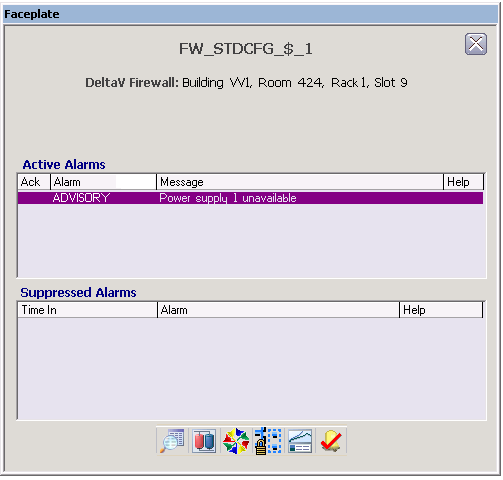
The following items are contained in the faceplate:
-
Active Alarms - This is a scrollable list of the current alarms that functions like columns of an alarm summary. The first column shows the acknowledge state of the alarm represented by one of the following symbols:
The second column is the alarm name. The text and colors are as configured for the alarm's current state.
The third column is the configured alarm message.
The fourth column (Help) appears, but is active only if DeltaV Alarm Help is licensed on this node.
-
Suppressed Alarms - This is a scrollable list of suppressed alarms (either shelved, out of service or both) that functions like the columns of an alarm summary. The columns are:
-
Toolbar - Click the icons from left to right to perform the following functions, respectively:
-
Detail Display button: open the detail display for the loop module.
-
Primary Control Display button: open the primary control display.
-
Conditions Summary button: opens the Conditions Summary application.
-
Network Device Command Center button: opens the Network Device Command Center (NDCC) application.
-
Event Chronicle button: open the Process History Viewer.
-
Acknowledge Alarms button: acknowledge all alarms on this module.
-