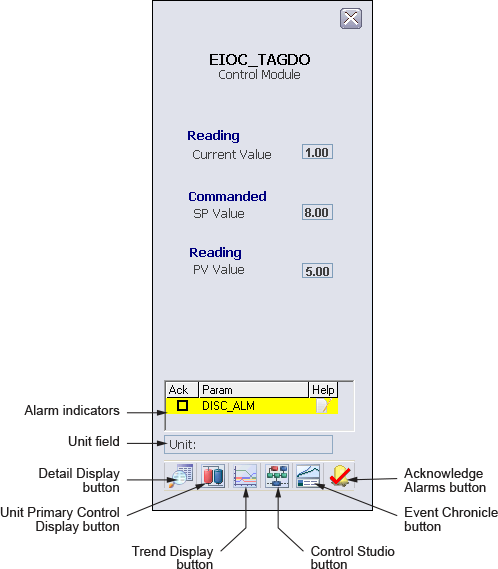
The following items are contained in the Tag Discrete Output function block faceplate:
-
Alarm indicators This is a scrollable list of the current alarms that functions like the first two columns of an alarm summary. The first column shows the state of the alarm represented by one of the following symbols:
The second column is the alarm name or parameter. The text and colors are as configured for the alarm's current state.
-
Unit field - This field displays the unit name.
-
Toolbar - Click the icons from left to right to perform the following functions, respectively:
-
Detail Display button: open the detail display for the loop module.
-
Unit Primary Control Display button: open the primary control display.
-
Trend Display button: open the current trend display for the loop module.
-
Control Studio button: open Control Studio.
-
Event Chronicle button: open the Process History Viewer.
-
Acknowledge Alarms button: acknowledge all alarms on this module.
-