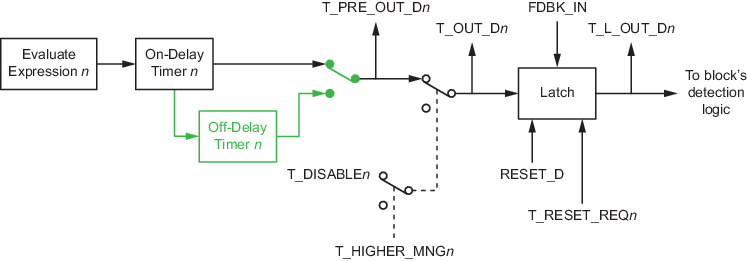
The AT block evaluates up to 16 tracking conditions. The output of the condition can be delayed on, delayed off, or disabled.
The block can optionally latch one or more active tracking conditions that keep the block tracking discrete output to True until all tracking conditions evaluate to False and a reset is triggered.
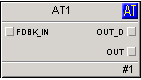
The block generates outputs that can typically be used by another downstream analog function block (PID, Ratio, Bias/Gain, Fuzzy Logic, and Manual Loader) as inputs for their tracking functionality. Additionally, the block can store the first tracking conditions.
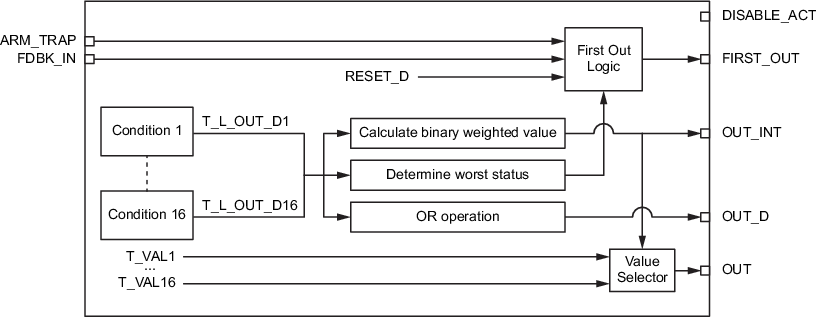
- The tracking discrete output (OUT_D), used to initiate/enable the external tracking of another downstream analog block.
- The tracking analog output (OUT), used as a tracking input value of another downstream analog block.
- Another tracking output (OUT_INT) is calculated based on the weighted binary sum of the tracking conditions (similar to BFI).
- The tracking first out output (FIRST_OUT), the bit value of the highest priority condition (lowest condition number) that is currently active. If another condition that has a different track value (T_VALn) and a higher priority becomes active, FIRST_OUT changes to the bit value of the newly active condition
The event record includes the number and description and the tracking analog value of the condition(s) for the first two cases.
The block supports tracking condition signal status propagation to the tracking discrete output and generates a bypass alarm when at least one of the tracking input conditions is disabled.
There are no modes in the Analog Tracking function block itself. The target analog block mode is set to Manual when the condition is true and the condition's associated parameter is true.
The following figure shows a simplified view of the internal components of the Analog Tracking function block:
The following figure shows the details of the conditions of the Analog Tracking function block: