This dynamo is used to configure alarm roll-up calculations and shows alarm count information during runtime.
Alarm roll-ups can be configured in modules matching the normal
breakdown of Area > Unit > Equipment Module > Module, or they can be
customized for modules that do now match the normal breakdown of Area > Unit
> Equipment Module > Module. If you choose to customize your alarm
roll-up, you must configure the control module that will perform the alarm
calculations in Control Studio. Using a CALC block, add the following code to
the module:
Pn := 255;
Cn := 0;
Nn := 0;
Count := 0;

Pt := '//MODULE/ALARMS[1].PRI';
Ct := '//MODULE/ALARMS[1].CUALM';
Nt := '//MODULE/ALARMS[1].NALM';
IF ((Nt > Nn) OR (Ct * (Cn - 1) < 0) OR ((Nt = Nn) AND ((Ct != 0)=(Cn != 0)) AND (Pt > Pn))) THEN
Pn := Pt;
Cn := Ct;
Nn := Nt;
Count := Count + 1;
ELSE
IF (Nt > 0) OR (Ct > 0) THEN
Count := Count + 1;
END_IF;
END_IF;


'^/PRI' := Pn;
'^/CUALM' := Cn;
'^/COUNT' := Count;
'^/NALM' := Nn;
The table below lists all of the elements that may be present on the HP_Alarms dynamo when configuring it. Click the link to see a description of the element.
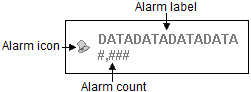
| Dynamo element |
|---|
| Alarm label |
| Alarm count |
| Alarm icon |
| Dynamo hotspot |
| Information hover window |