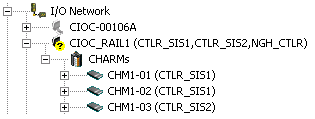
After a CHARM has been defined, it can be assigned to a controller making it is available for use in control strategies. When a CHARM has been assigned to a controller, the controller name appears in parenthesis next to the CHARM's name in the DeltaV Explorer hierarchy as shown in the following image. Notice that the controller assignments also appear next to the CIOC name. CHARMs from a single CIOC can be assigned to a maximum of four controllers.
- MX
- MQ
- MVIRTUAL
- PK
- SD Plus
- SX
- SQ
- SVIRTUAL
- MD Plus
Note
MD Plus controllers must be commissioned before you can assign CHARMs to them.
CHARMs can be assigned to controllers individually, as a group, or all 96 CHARMs under a CIOC can be assigned to a controller.
-
To assign an individual CHARM to a controller, drag the CHARM to a controller.
-
To assign a group of CHARMs to a controller, expand the CHARMs container, use the SHIFT and CTRL keys to select multiple CHARMs , and drag the group of CHARMs to a controller.
-
To assign all CHARMs under a CIOC to a controller, drag the CIOC to a controller or drag the CHARMs container to a controller.
Another way to assign all 96 CHARMs to a controller is to right-click the CHARMs container, select Assign, and then browse to a controller.