If you need to delete module assignments from controllers in your configuration the recommended way is:
If you attempt to remove a module assignment from your configuration by deleting the assignment, then performing a total download, you must download twice (total download followed by ) to prevent DeltaV Simulate from displaying modules that have not been completely removed. This additional download is necessary because of the way the system manages module assignments and deletions during the download process.
You install the DeltaV Simulate capability on your computer using the standard DeltaV installation procedure.
Once you have installed DeltaV Simulate, the capability of the ProfessionalPLUS workstation is provided for configuration support, including continuous control execution.
Beginning with DeltaV v14.3, configuring a simulation scenario to save and restore the system state for Batch logic is fully supported.
Be advised that if some, but not all, Batch parameter prompts were acknowledged just before the save (i.e. due to phase Request = 1000), then all parameter prompts will be reissued upon restore.
Technical support is available for DeltaV Simulate when a particular hardware configuration is used. Refer to the DeltaV Simulate product data sheet for information regarding this hardware configuration.
In the Standalone version of DeltaV Simulate, an Ethernet card is not required as part of your computer hardware. If you have an Ethernet card installed on your computer for connection to your plant or office LAN, the installation of DeltaV Simulate will not change the TCP/IP settings for this connection. This allows you to continue using DeltaV Simulate while your computer is connected to your plant or office LAN.
The Standalone version of DeltaV Simulate does not support Ethernet connections to a DeltaV system. To transfer configuration work, you must export from your computer and then import to your DeltaV system.
DeltaV Simulate Multinode supports interconnecting PCs to allow simulated control execution to be distributed between several machines. You can also include Operator Stations and controllers to support training requirements.
Using Simulate with a new database
If you have created a new database and set it to the active database using the DeltaV Database Administration application, you must rerun DeltaV Workstation Configuration and select the Simulate for standalone laptop or workstation option. Otherwise, an incorrect IP address is assigned to the PC and you will be prevented from downloading.
Assigning and Downloading Modules
In DeltaV Explorer an Assigned Modules folder is included under your computer. Assign modules that you want to test dynamically to this folder.
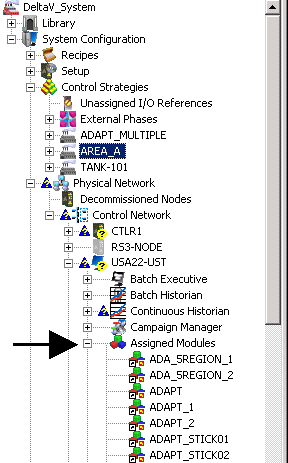
After you assign modules and download your computer, the modules assigned to the computer begin executing at the configured execution rate automatically. You can examine the execution of a module in the computer from Control Studio's online mode. If your system configuration contains blocks whose I/O are assigned to fieldbus, use the Simulate Conversion utility in SimulatePro to allow simulation of the execution of these function blocks. The Simulate Conversion utility also allows the simulation of external references to I/O.
The execution engine in the computer is limited by memory. The number of modules that your computer can execute at one time depends on the number of function blocks included in each module. You are notified when this limit is exceeded. Typically, DeltaV Simulate on a standalone PC can simulate the execution of the modules that would be assigned to one controller or less. A node with SimulatePro capability assigned to it can simulate execution, in real-time, of the modules that would be assigned to up to four controllers. Workstation loading, which is a function of the real-time execution multiplier setting, more than doubles at 2X execution speed.
Using the SIMULATE Parameter
Using the SIMULATE parameter for both the DeltaV I/O blocks and the fieldbus I/O blocks, you can manually inject field measurement values and status to check out control logic, alarming, displays, and so on. By changing the status or value associated with a measurement, the action taken by control logic execution in the DeltaV Simulate environment can be examined. You can also use this capability to test whether block parameter values and status are displayed correctly in the screens you designed. By changing the measurement value through the SIMULATE parameter, you can force an alarm condition, which allows you to verify assigned alarm priority as well as the manner in which alarms become visible to the operator (for example, the Event Chronicle and alarm banner in DeltaV Operate).
Dynamic Process Simulation
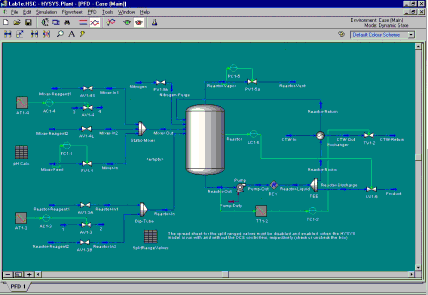
You can create dynamic process simulations to support process design as well as operator and engineering training. Using the standard function blocks available in DeltaV Control Studio's Analog Control and Math palette, you can create a simple dynamic model of your process model. Also, process simulation packages can support operator training. To support process design with DeltaV control, you can use high-fidelity process simulation packages.
Process Simulations Through Function Blocks
You can use the standard calculation and dynamic blocks provided in DeltaV Control Studio's Analog Control and Math palette to construct a simple dynamic process model for testing control strategies and operator training.
Using Applications for Process Simulation
Application packages that support an OPC interface are compatible with the DeltaV Simulate environment. For example, you can use high-fidelity dynamic process simulation software with DeltaV Simulate for plant and control design as well as control checkout and operator training. Other process simulation software supports control system checkout and operator training. These process simulation applications utilize the simulate capability of both DeltaV I/O blocks and fieldbus I/O blocks.