The Application Station acts as a gateway between the DeltaV Control Network and other applications and networks. DeltaV OPC Data Access Server runs on this machine providing DeltaV run-time access to applications that are running either on the Application Station or on a machine with a network connection to the Application Station.
In order to run an OPC client on a non-DeltaV workstation, you must install the OPC Remote application. To install the OPC Remote application, run the setup.exe program located in the DV_Extras\OPCRemote folder on DeltaV installation disk #4. The version must be the same as the installed version of the DeltaV software.
To uninstall OPC Remote, go to Programs and Features in Windows Control Panel and select OPC Remote from the list. Click the Change/Remove button and follow any dialogs presented. Connection to the DeltaV OPC Server is not available from the workstation when OPC Remote is uninstalled.
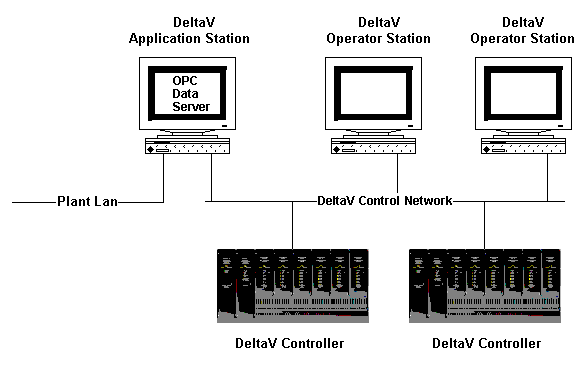
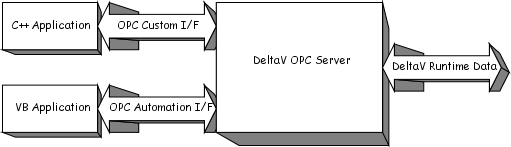
OPC client applications can use the COM compliant Custom Interface or the OLE Automation Interface of the DeltaV OPC Data Access Server. The custom interface supports clients written in C++. The OLE Automation Interface supports higher level business applications such as Excel, Visual Basic, etc.
OPC clients can define one or more OPC groups within the DeltaV OPC Data Access Server.
The OPC groups provide a way for clients to organize the data. Items in the same group have the same freshness (time resolution), percent dead band in which to ignore changes and time bias. Also, a client application can request to be notified when any data in a group changes.
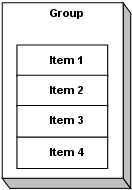
Within each group the client can define one or more OPC items.
The OPC items represent connections to data sources within the server. A value, a Quality Mask and a Timestamp are associated with each item. The value is a VARIANT type. The Quality Mask is similar to a quality flag. It shows the quality state of an item's data value. Quality flags are described in the OPC Data Access Custom Interface Specification. This specification is available at http://www.opcfoundation.org.
Note that the items are not the data sources; the DeltaV system is the data source. Items are simply connections to a field of a parameter in the DeltaV system.