While the possibility is considerably diminished when the Application Stations running redundant DeltaV OPC Data Access Server are connected to a primary and secondary DeltaV network, it can happen that the standby DeltaV OPC Data Access Server cannot assume standby status after an otherwise successful switchover. Conditions that may lead to this state include: temporary, general loss of network connectivity or extreme CPU overload.
When the active DeltaV OPC Data Access Server is functioning normally, but the standby DeltaV OPC Data Access Server is unable to assume standby status, the DeltaV Diagnostics program will clearly indicate problem areas in the diagnostic parameters for . Also, all lights in the DeltaV Status window on the Application Station running the standby DeltaV OPC Data Access Server that could not assume standby status will be illuminated, as shown in the following illustration:
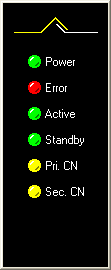
If the Unattended Workstation Reboot on Failover or Manual Switchover option is enabled for the Application Station pair when the standby DeltaV OPC Data Access Server is unable to acquire standby status, the unattended reboot may not occur under switchover conditions that would otherwise trigger it. Manually restarting the Application Station allows the standby DeltaV OPC Data Access Server to reacquire standby status and does not affect the operation of the Application Station running the active DeltaV OPC Data Access Server.