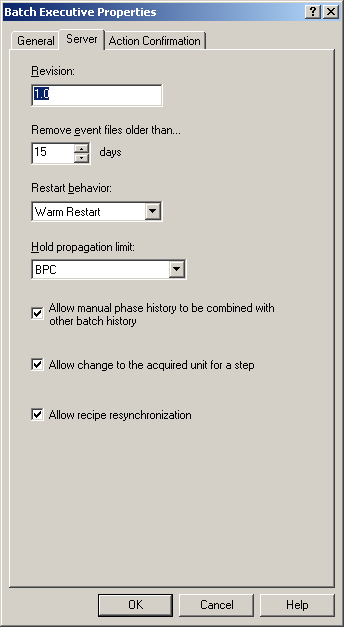
Batch Executive Server configuration
In addition to enabling the Batch Executive, there are certain Batch Executive behaviors that must be configured. These include the following items found on the Server tab:
Revision: This field is not currently implemented.
Remove event files older than (days) - remove records older than the number of days specified. Once past that day, the event file is deleted. It is advisable to remove event (.evt) files frequently thereby only storing a minimum (under a few hundred) event files at any given time. This will enhance the Batch Executive's performance.
If the event file is being accessed by a client when the maintenance cycle is run (12 AM), the file cannot be processed and the events that are older than the day specified are not removed.
Restart behavior - sets the method for restarting the Batch Executive in the event that it closes. The choices are as follows:
-
Query User - prompts the user to select between warm and cold restart, or to cancel the restarting process.
-
Warm Restart - returns the Batch Executive to its last known state. The warm restart method is the preferred restart method. After a warm restart of the Batch Executive, all current batches are put in the LOST state. The operator must RESTART each batch individually.
If several batches had been waiting to acquire the same unit before the shutdown, they would have been queued in a certain order, dependent on when they made the acquire request. After the warm restart, these batches are queued in exactly the same order they were in before the warm restart. Review the order of the queue on the Arbitration screen of the Batch Operator Interface and verify that the current order is the correct order for the batches to use that unit.
-
Cold Restart - to start the DeltaV Batch Executive with an empty batch list and with no resources allocated to the operator. This method should only be used to clear the batch list in the unusual event where all previous batches have already been cleared out of the plant manually.
Hold propagation limit - sets to what recipe level a HOLD propagates. The Batch Executive responds based on the level set in the Batch Executive Properties dialog. The Batch Executive can either not propagate the HOLD (when None is selected), or can hold the batch at the procedure level, the unit procedure level, the operation level, or the phase level.
The hold propagates only to the level specified, therefore, it is possible to have one unit procedure (or operation or phase) held while others in the same recipe continue to run. Parallel steps in a recipe are sent a Hold command when the first step goes Holding. To restart the held item in this instance, go to the recipe level above (that is, to the procedure when a unit procedure is held, and so on), put that item into manual mode and then restart the held item.
Hold propagation cannot be applied when a held step's upper levels are in Manual mode. That is, if an operation goes Held, but that step's unit procedure is in Manual mode, then hold propagation is not applied. When that unit procedure is put into Auto mode, then hold propagation is applied.
-
None - no propagation set. The HOLD remains at the level where it occurred.
-
BPC - procedure level
-
UPC - unit procedure level
-
UOP - operation level
-
Phase - phase level
Allow manual phase history to be combined with other batch history - enables the ability to combine a manual phase's history with another batch's history (for example, with the 'parent' batch). If this option is enabled, the operator is given the option when starting a manual phase to select a batch (by batch ID) with which the manual phase history will be combined. The operator can also opt to not combine the histories.
If this option is not selected in the Batch Executive Properties dialog, the operator cannot combine histories when starting a manual phase.
Allow change to the acquired unit for a step - Enables the rebinding of equipment on previously active steps. The next time the step becomes active, it uses the new equipment binding.
Allow recipe resynchronization - enables recipe resynchronization when performing a restart of a batch that is in the Lost or Recovered Failed states. Use this when a recipe has been changed and downloaded and you want the batch to use the changed recipe when it is restarted.
Server Properties of the Batch Executive