Warm restart of a batch from the lost and recover_failed states
If a batch is in the Lost or Recover_Failed state, you can select it for restarting. After you click the Restart button you are asked if you want to perform a Warm or Cold Restart. Select Warm Restart (which is usually the preferred method) and the batch transitions through the Recovering state to the Held state in Manual mode. Put the batch in Auto mode and click the Restart button again to restart the batch.
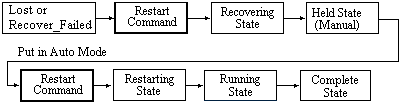
One of the ways a batch can be in the Lost state is after being forced to shut down from the Administer Batches tab on the Advanced dialog for the Batch Application Manager.
To determine why a batch is in the Recover_Failed stated, right-click the batch in the batch list.
If the batch does not complete the warm restart successfully, perform a cold restart and active step change to the point where the batch stopped.