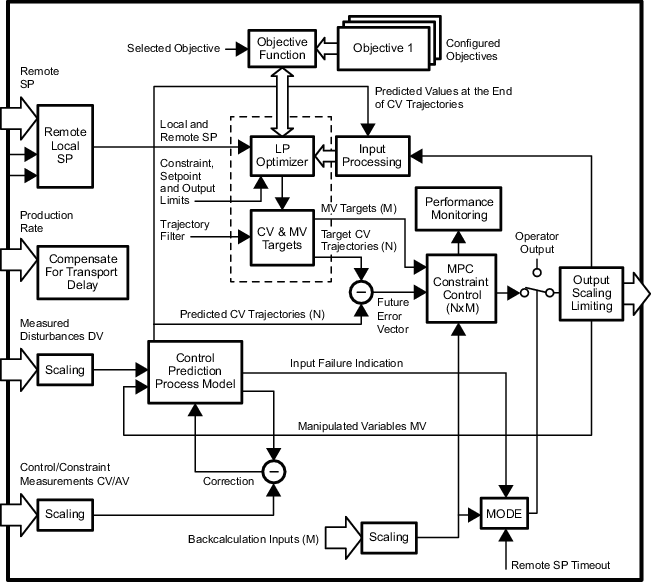
The DeltaV Model Predictive Control Professional Plus (MPCPlus) function block allows interactive processes as large as 40 Inputs ×80 outputs to be controlled within measurable operating constraints while accounting for process interaction and measurable disturbances. Use the MPCPlus block instead of the MPCPro block to improve the performance of highly constrained configurations, to improve the flexibility of the operation through the use of online tuning parameters to generate the controller and for online controller reconfiguration. An embedded optimizer is included with the MPCPlus block. The optimizer can be used to effectively provide maximum profit or lowest cost production within the process constraints and limits on process inputs.
The MPCPlus function block can replace traditional control systems that use feedforward, decoupling networks and override for multivariable control. The parameters of the MPCPlus function block are configured in Control Studio. When a module that contains the MPCPlus block is downloaded, all inputs and outputs used by the MPCPro block are automatically assigned to the Continuous Historian.
The history collection rate of the MPCPlus function block parameters is defined as part of the block configuration
You use the DeltaV PredictPro application to commission the MPCPlus block, to easily determine the process step response, and to automatically test the process. Using the historical data that reflects automatic or manual process testing, the PredictPro application can automatically identify the process step responses. The control definition used by the MPCPlus function block is generated online from the downloaded model. The PredictPro Simulation application can be used to verify the control before it is used in your process.
You can use the DeltaV Control Studio application to convert an MPCPro application to an MPCPlus application. Refer to the PredictPro online help for information.
The operator runs the control through a DeltaV Operate screen built with the MPCPlus dynamos.
The MPCPlus function block supports modes and status handling.
The MPCPlus function block is not supported in composites.
The function blocks that provide the MPCPlus inputs and outputs (AI scaler, AO, PID, Ratio, Fuzzy, Bias/Gain, Splitter) can reside in the same module as the MPCPlus block or in other modules. Use the Scaler function block as the MPCPlus reference when another function block that does not support scaling (such as a Calc/Logic function block) is referenced as an input to the MPCPlus function block. Insert the Scaler function block after the Calc/Logic block and reference the Scaler output in the MPCPlus function block. This provides the appropriate parameter (OUT_SCALE) for the input parameters reference by the MPCPlus block. The path for Controlled, Manipulated, Disturbance, and Constraint parameters must ultimately point to a reference that is resolved. For example, if the parameter path points to the OUT parameter of a Scalar block; the IN parameter of the Scalar must be wired to a parameter associated with a resolved reference. Specifically, the scalar should not be wired to a DST that contains an invalid IO reference nor wired to a dynamic reference that can become unresolved. Refer to the following figure, MPCPlus Function Block, and notice that the MPCPlus block has no input and output connections. The user configures the MPCPlus block in DeltaV Control Studio to directly reference function block inputs or outputs.